Part 3 of 18 · 7 min read
Making intent visible in the interface
Editable action cards, stale-response protection and a typed Next.js navigation contract.
Arunank Sharan · Kuzushi Labs ·
In this article
When someone asks an application to act, they need to see what it understood. “Book a follow-up” leaves too much hidden if the only response is a sentence saying it is done.
We explored an interface that turns language into a visible, inspectable proposal. The dashboard has two complementary surfaces: a conversational assistant and a command bar. Their interaction ideas overlap, but their implementations are different.
A conversation that can return UI
The assistant panel submits a message, session identifier and context to the backend. The response can include ordinary text, clarification questions, a pending action and structured action cards.
The card renderer selects a React component according to the returned card type. Patient cards, appointment cards, journey cards and communication cards give different operations an appropriate presentation. The model does not generate arbitrary React code for the browser to execute; the application owns the component vocabulary.
This is the practical meaning of an action-generating interface in this project. Structured data selects a known component. The component shows the relevant fields and exposes actions the application understands.
An appointment preview, for example, can show the patient, practitioner, time and appointment type. A separate pending-action control carries the action identifier used for confirmation or cancellation. That identifier connects the user's click to a server-side proposal.
The command bar makes interpretation editable
The command bar opens with Cmd/Ctrl+K. It supports keyboard navigation through suggestions, recent commands, contextual quick actions and a preview before execution. Parsing is triggered after a 300 ms debounce, which keeps it from restarting on every keystroke.
The preview—called a ghost card in the implementation—makes extracted entities visible. Patient, practitioner, date, time and location have their own types. An entity can have a confidence value, a verification flag and alternatives that the user can choose.
I like this pattern because a correction is local. If the date is right but the practitioner is wrong, the user should be able to correct the practitioner without rewriting the entire request. Missing required fields can also remain visible instead of disappearing into another round of chat.
The state model distinguishes parsing, parsed, confirming, executing, success, error and partial success. Those distinctions are useful only when the transitions reflect real events. A preview is an interpretation; an execution result is evidence that the operation happened.
What this snapshot actually connects
The assistant panel has a backend API path. The command-bar store still uses a simulated parser and returns a simulated success result after a delay. Those pieces let us develop the interaction, but they are not proof that a command changed a patient record.
Navigation has a similar boundary. The interface exposes “view” and “edit” affordances, but the generic assistant handlers still show notifications rather than completing navigation or editing. The command bar navigates its suggestion list; that is different from routing the user to a newly created business object.
To complete the navigator, I would have a successful operation return a typed destination, such as an appointment identifier and a supported destination kind. The frontend would map that kind to an allowed application route. A patient or appointment selected from the interface should remain the same object when the user opens the destination.
That is a small contract with a large effect: it connects intent, action and the next useful screen without allowing arbitrary model-generated URLs to control navigation.
Implement a typed route instead of returning a URL
The missing navigation path is small enough to specify concretely. After a successful booking, the backend should return a destination tied to the persisted object:
{
  "status": "succeeded",
  "appointment_id": "appt-001",
  "destination": {"kind": "appointment", "id": "appt-001"}
}
In a Next.js implementation, I would keep the routing rule in application code. This is a reference frontend adapter:
type Destination = {
  kind: "patient" | "appointment" | "journey";
  id: string;
};

function destinationPath(value: Destination): string {
  const routes = {
    patient: "patients",
    appointment: "appointments",
    journey: "journeys",
  } as const;
  if (value.id === "." || value.id === ".." || !/^[A-Za-z0-9.-]{1,64}$/.test(value.id)) {
    throw new Error("Invalid destination identifier");
  }
  const segment = routes[value.kind];
  if (!segment) throw new Error("Unsupported destination");
  return `/dashboard/${segment}/${value.id}`;
}

// Inside a client component with a validated API response:
// router.push(destinationPath(result.destination));
The server response still needs runtime schema validation; a TypeScript type does not validate JSON arriving over the network. The destination page must independently authorize the record. Routing is a convenience, never an access-control decision.
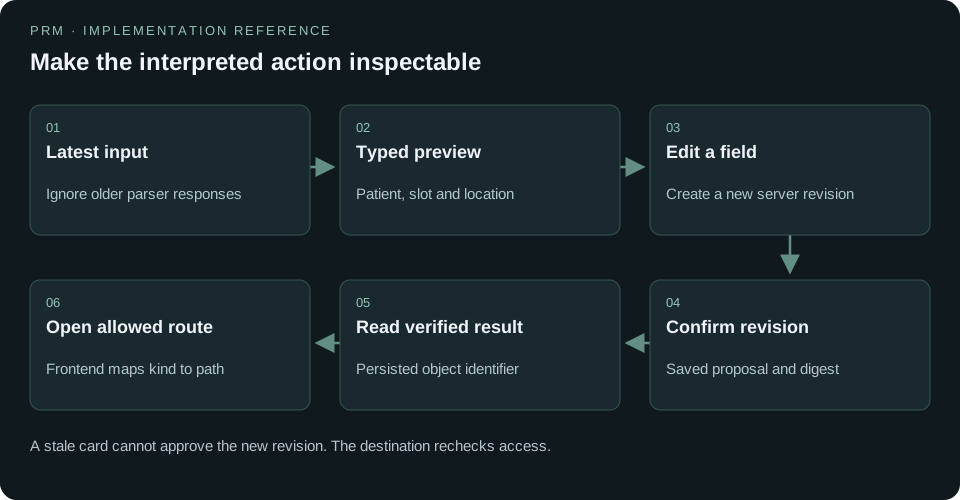
Prevent a slow interpretation from replacing a newer one
The existing 300 ms debounce reduces requests. It does not, by itself, stop responses from arriving out of order. A user might type “Tuesday,” then correct it to “Thursday,” while the first parser request is still running.
I would attach a monotonically increasing request number to every interpretation attempt and ignore older responses. Aborting the old fetch saves work where supported, but the ordering check is still necessary:
let parseSequence = 0;
let activeRequest: AbortController | undefined;

async function parseLatest(input: string, apply: (value: unknown) => void) {
  const sequence = ++parseSequence;
  activeRequest?.abort();
  const controller = new AbortController();
  activeRequest = controller;
  try {
    const response = await fetch("/api/copilot/interpret", {
      method: "POST",
      headers: { "Content-Type": "application/json" },
      body: JSON.stringify({ input }),
      signal: controller.signal,
    });
    if (!response.ok) throw new Error("Interpretation failed");
    const value: unknown = await response.json();
    if (sequence === parseSequence) apply(value);
  } catch (error) {
    if (!(error instanceof DOMException && error.name === "AbortError")) {
      throw error;
    }
  }
}
That route is proposed, not an endpoint already demonstrated by the command-bar prototype. In a React component, the sequence and controller belong in component-scoped refs, with unmount cleanup. The compact function illustrates the ordering rule without mixing in presentation code.
Treat editing as a new proposal
Changing a displayed time should call a revision endpoint. The server revalidates the new slot and returns a new proposal revision and hash. The confirmation button then refers to that revision. Patching only the card's local state produces a dangerous mismatch: the user sees Thursday while the server still holds Tuesday.
I would use four explicit messages: “Checking availability,” “Ready to review,” “Booking in progress” and “Booked.” A transport timeout after confirmation becomes “Checking booking status,” with a lookup using the original idempotency key. It should not turn into either an unearned success toast or an automatic second booking.
Exercise the interface as a coordinator would
For a useful browser test, I would start on patient p-001, prepare a booking, change the time, receive a delayed response for the old time and verify that the new selection remains. I would then confirm twice, simulate a lost response and reload. The final appointment card must identify the one persisted appointment and open its permitted route.
Accessibility belongs in that same path. The review should expose labeled fields, keyboard-operable alternatives, a clear confirmation control and an announcement when execution completes. Returning focus to the command input after an error makes correction possible without starting over. These details determine whether the fast interface remains usable during a busy clinic session.
Voice is another way to supply the command
The command-bar voice component uses the browser's speech-recognition interface, with interim transcripts and an en-US language setting in this snapshot. The completed transcript moves into the same input field.
This is voice input to the workflow interface. It is separate from a live telephone agent or a demonstrated multilingual speech service. The product advantage is that text and speech can share the same preview, correction and confirmation steps after the transcript is available.
My main takeaway is that the interface should expose the interpretation before asking the user to trust the action. The visible fields, known components and explicit destination are as important as the quality of the initial language model response.
The implementation kit includes the articles, diagrams and an offline reference lab. Code identified as a reference design is a new teaching implementation; it is not a claim that the original project already shipped that behavior.