Part 9 of 14 · 7 min read
A citation should take the analyst to the evidence
Paragraph identity, PDF coordinates, HTML highlighting and the interface that makes answers inspectable.
Arunank Sharan · Kuzushi Labs ·
In this article
A citation that opens a long annual report is a useful start. It is not the end of the analyst’s verification task. The reader still has to find the paragraph, identify the relevant column and decide whether it supports the answer.
Paragraph-specific citations were part of the client’s product work. The UI included PDF, HTML and text viewing, page navigation, bounding-box highlights and text matching. The implementation used Next.js, React, TypeScript, Zustand and PDF.js through react-pdf.
This is where a RAG system becomes inspectable. The user can move from an answer to the source evidence without repeating the retrieval process manually.
A citation is a contract across the system
The citation starts during parsing. If the parser discards source locations, the UI later has to rediscover them from text. That can work for simple passages and fail badly for repeated language or tables.
The full chain should be:
immutable document → parsed block → retrieval passage → evidence handle
                  → answer claim → source resolver → highlighted region
A useful reference keeps both logical and visual anchors:
{
  "citation_id": "E1",
  "document_version": "example-annual-2024-v1",
  "passage_id": "debt-note-paragraph-3",
  "page_index": 41,
  "display_page_label": "42",
  "quote": "The maturity schedule excludes finance lease liabilities.",
  "regions": [{"x": 72, "y": 240, "w": 468, "h": 44}],
  "coordinate_space": "top-left-page-points",
  "page_dimensions": {"width": 612, "height": 792},
  "render_version": "pdf-original-v1"
}
The quote helps the reader understand why the citation is relevant. The immutable IDs keep it stable. The region makes navigation practical. The render version prevents a layout change from silently invalidating the coordinates.
The answer should cite evidence handles
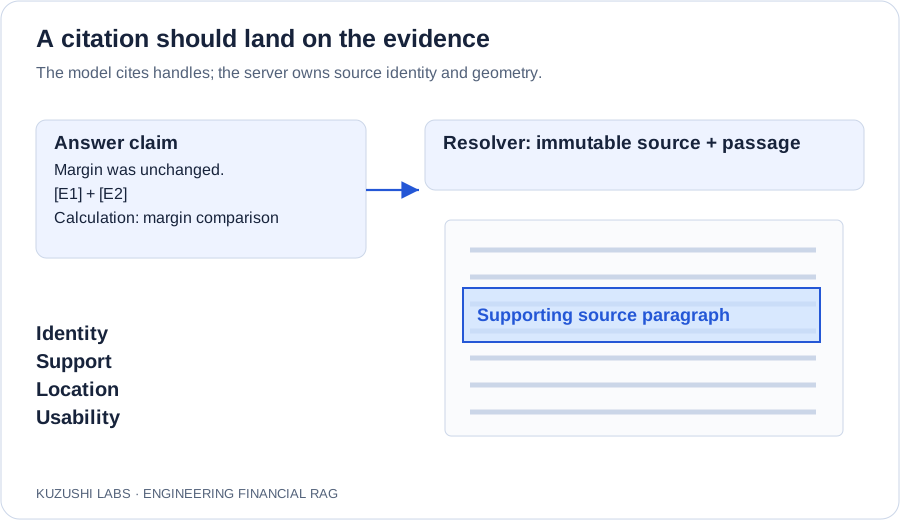
The generator receives a bounded set of evidence handles such as E1, E2 and E3. It can associate them with claims. The backend resolves them to documents and source spans.
The generator should not create document URLs, infer page numbers or fabricate a bounding box. Those are deterministic references already known to the system.
A claim may need more than one citation. A calculated margin change needs both periods’ inputs. A claim about management changing its outlook needs both statements. Attaching one citation at the end of a long paragraph can hide which sentences are supported.
A useful answer representation groups claims and evidence:
{
  "claims": [
    {
      "text": "Operating margin was unchanged at 15.0% in the two periods.",
      "evidence_ids": ["E1", "E2"],
      "calculation_id": "margin-comparison-1"
    }
  ]
}
Before rendering, validate that every evidence ID exists in the authorised packet. Then check whether the referenced text actually supports the claim. Existence and support are separate checks.
PDF coordinates need an explicit convention
The client’s PDF viewer converted source coordinates into percentages of the page dimensions and rendered an absolute overlay over the page. For top-left coordinates, the basic transform is:
left%   = x / page_width × 100
 top%   = y / page_height × 100
width%  = box_width / page_width × 100
height% = box_height / page_height × 100
This is convenient when the page scales proportionally. It assumes the parser and renderer agree on orientation, page crop and coordinate origin.
from math import isfinite

def percentage_box(x, y, width, height, page_width, page_height):
    values = (x, y, width, height, page_width, page_height)
    if not all(isfinite(v) for v in values):
        raise ValueError("Non-finite coordinates")
    if page_width <= 0 or page_height <= 0 or width <= 0 or height <= 0:
        raise ValueError("Invalid page or region dimensions")
    if x < 0 or y < 0 or x + width > page_width or y + height > page_height:
        raise ValueError("Region is outside the page")
    return {"left": 100*x/page_width, "top": 100*y/page_height,
            "width": 100*width/page_width, "height": 100*height/page_height}
Do not silently clamp invalid boxes to the page. A clamped region can look plausible while highlighting the wrong text.
If coordinates originate in PDF user space with a bottom-left origin, account for the viewport transform, crop and rotation. PDF.js exposes page viewport information for this purpose. Use the same transform that renders the page rather than a separate guessed scaling formula. PDF.js page API
A paragraph is not always one rectangle
A paragraph can wrap across columns. A financial fact can span several cells. A footnote can appear at the bottom of the page while the value it qualifies is near the top.
Support multiple regions per citation. Highlight the exact relevant regions, but also allow the analyst to expand surrounding context. A small highlight is useful for navigation; it should not obscure the heading or unit that changes the interpretation.
Distinguish the PDF’s physical page index from its printed page label. Page 42 in a viewer can contain a printed page number of 38 because of front matter. Store both and avoid performing arithmetic on the printed label.
HTML highlighting has a different geometry problem
The HTML viewer used a controlled logical page size, scale and scroll position. It placed highlight overlays in that rendered coordinate system and kept page navigation synchronised with scrolling.
HTML layout is not fixed like a PDF. Fonts, viewport width, line wrapping and sanitisation can move text. A box recorded against one layout may drift under another. Treat synthetic HTML pagination as a viewer convenience, not as an original source-page number.
For a robust design, prefer a stable DOM block identifier plus a text anchor and source-version hash. Resolve the anchor after the document has rendered with known fonts and layout. Compute highlight rectangles from the live range. If fixed coordinates are necessary, bind them to a pinned render configuration.
The text viewer’s exact-match path provides a useful fallback. Exact matching still needs disambiguation when the same sentence appears several times. Add prefix/suffix context, a block ID and an occurrence position. Fuzzy matching can be useful as a recovery strategy, but should never silently select a different occurrence merely because it is similar.
Source documents are untrusted content
A retrieved filing or uploaded HTML document can contain scripts, links and instructions. It should be displayed as source material, not granted application privileges.
For HTML, sanitise active content, block unwanted external resource loading and use an isolated rendering context. Avoid combining script execution with same-origin access for untrusted source HTML. A screenshot or static render can be a better choice for difficult documents when source interactivity is unnecessary.
For PDFs, keep the rendering dependency updated, bound file size and page processing, and avoid eagerly rendering every page of a very large report. Virtualise pages around the visible region, prefetch nearby pages and preserve the selected citation when a page is temporarily unmounted.
These are operational requirements for a viewer that will handle a large and varied corpus, not just a short demo document.
Make verification accessible
The citation should be reachable with the keyboard and have a meaningful label, such as “Source 1, annual report, debt note.” Opening it should move focus predictably to the viewer or source heading, with a clear route back to the answer.
Colour alone is insufficient to communicate the highlight. Add a border, source label and text excerpt. At narrow screen widths, preserve both the claim and its evidence context even if a split-pane layout becomes a stacked view.
The analyst should also be able to distinguish a source that is loading, unavailable, superseded or outside current access rights. A blank panel is not an adequate failure state.
Evaluate citation correctness in layers
Measure four separate properties:
- Identity: the reference resolves to the intended document version.
- Support: the cited passage supports the claim.
- Location: the highlight covers the intended source span.
- Usability: the analyst can reach and inspect it without confusing navigation.
For location, compare regions with annotated boxes or text-span coverage. For support, review the actual claim–evidence relationship. A perfect rectangle around an irrelevant paragraph is still a bad citation.
My contribution
My work connected source-grounded answers with the document-inspection experience: preserving the evidence reference across the pipeline and developing the UI mechanisms needed to navigate, scale and highlight the relevant PDF, HTML or text passage.